Demucs Windows
Because of that, a stable, reproducible path on Windows is:
- Python 3.10
- PyTorch 2.8.0 + cu126
- TorchAudio 2.8.0 + cu126
- TorchVision 0.23.0 + cu126
- Demucs 4.0.1
Create and activate a virtual environment
py -3.10 -m venv .venv
.\.venv\Scripts\Activate.ps1
python -m pip install --upgrade pip
Install the matching CUDA 12.6 builds from the official PyTorch wheel index:
pip install torch==2.8.0+cu126 torchaudio==2.8.0+cu126 torchvision==0.23.0+cu126 --index-url https://download.pytorch.org/whl/cu126Install Demucs and helpers
pip install demucs==4.0.1 soundfile
Verify the environment
python -c "import torch, torchaudio; print(torch.__version__); print(torchaudio.__version__); print(torch.cuda.is_available())"Expected result:
2.8.0+cu126
Usage
demucs -n htdemucs --two-stems=vocals "song.mp3"The song will be located in
./separated/htdemucs/<song>
WhisperX
pip install whisperx
Fix Hugging Face issues
$env:HF_HOME="$HOME\.cache\huggingface"
$env:HF_TOKEN_PATH="$env:HF_HOME\token"
New-Item -ItemType Directory -Force -Path $env:HF_HOME | Out-Null- make the required files for HF
Available models
tiny.en, tiny, base.en, base, small.en, small, medium.en, medium, large-v1, large-v2, large-v3, large, distil-large-v2, distil-medium.en, distil-small.en, distil-large-v3, distil-large-v3.5, large-v3-turbo, turbo
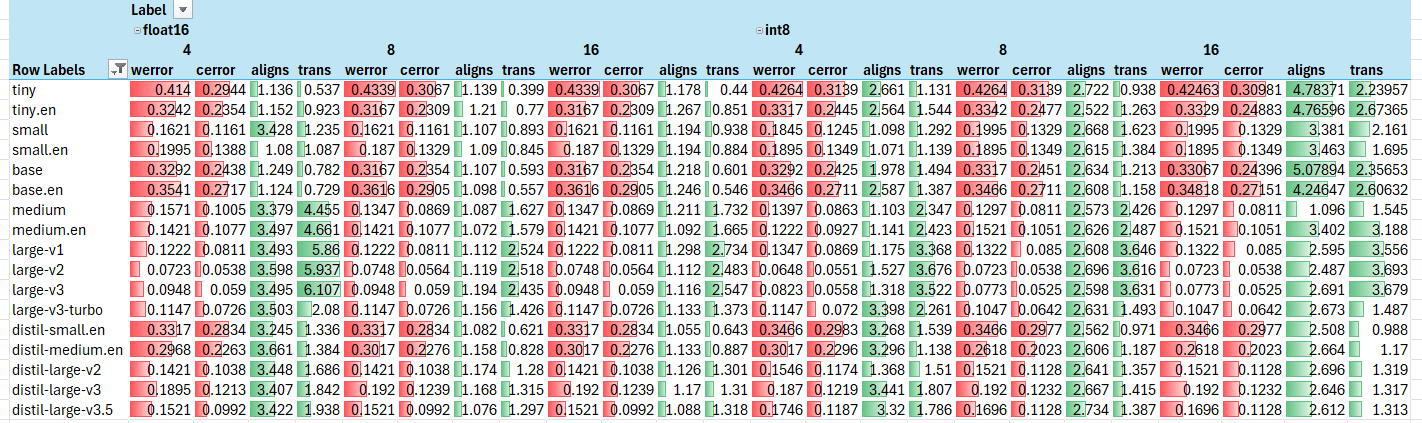
CUDA (RTX 4070)
- larger batch size results in faster speed (but likely more VRAM usage)
large-v2is the best balance between accuracy and speed
Publishing
- push have a tag for triggering Github actions image publishing
git tag v0.0.0-dev
git push -u origin v0.0.0-dev
large savings when using static ffmpeg buid
karaoke:debian-ffmpeg                      79853236c0d9       1.19GB          317MB
karaoke:static-ffmpeg                      052d0be9f885        615MB          158MB